In-app AI
10 B2B SaaS AI Features and the Agencies That Designed Them
Table of contents
- What a well-placed AI feature looks like
- The 10 AI features at a glance
- How we picked
- Who designed these features
- 1Sybill: AI deal copilot
- 2Oleria Copilot: an assistant inside a security platform
- 3Writesonic: AI search visibility and the AI SEO agent
- 4Avid: Playbook recommendations
- 5RedOwl: AI Assistant for budget approvals
- 6RevvedUp: Revveal research on every contact
- 7Accern Rhea: hybrid chat and widgets for financial research
- 8Suits.ai: a team of AI agents in one workspace
- 9Interviewd: AI interviews and a ranked recruiter view
- 10Inquisita: an AI drafting assistant lawyers can check
- AI features in SaaS: UX patterns these products share
- Frequently asked questions
Most lists of AI features in SaaS stop at the big names, and those features were built by in-house teams nobody can hire. If you are the one adding AI to your own product, the more useful question is which outside teams have already designed this kind of work and what they shipped.
So we went the other way. We read the AI case studies of the agencies in our directory, kept only features where a public page names the designer, and checked every screen against that case study before publishing. Each example below links to the designer's own write-up.
Quick answer: The best AI features in B2B SaaS sit inside a screen people already use, open with starter prompts instead of a blank box and leave a person in charge of anything that gets sent. Top examples are Oleria Copilot by Merge Rocks, Sybill's deal copilot and Writesonic's AI visibility product by Bricx, Avid's Playbook and RedOwl's AI Assistant by Eleken, and RevvedUp's Revveal research tab by Cieden. Lazarev.agency (Accern Rhea and Suits.ai), Halo Lab (Interviewd) and UX studio (Inquisita) designed the rest.
What a well-placed AI feature looks like
Oleria Copilot, designed with Merge Rocks, is a clean example of an AI assistant added to a product that already existed. The marked parts show the decisions that make it feel like part of the platform.
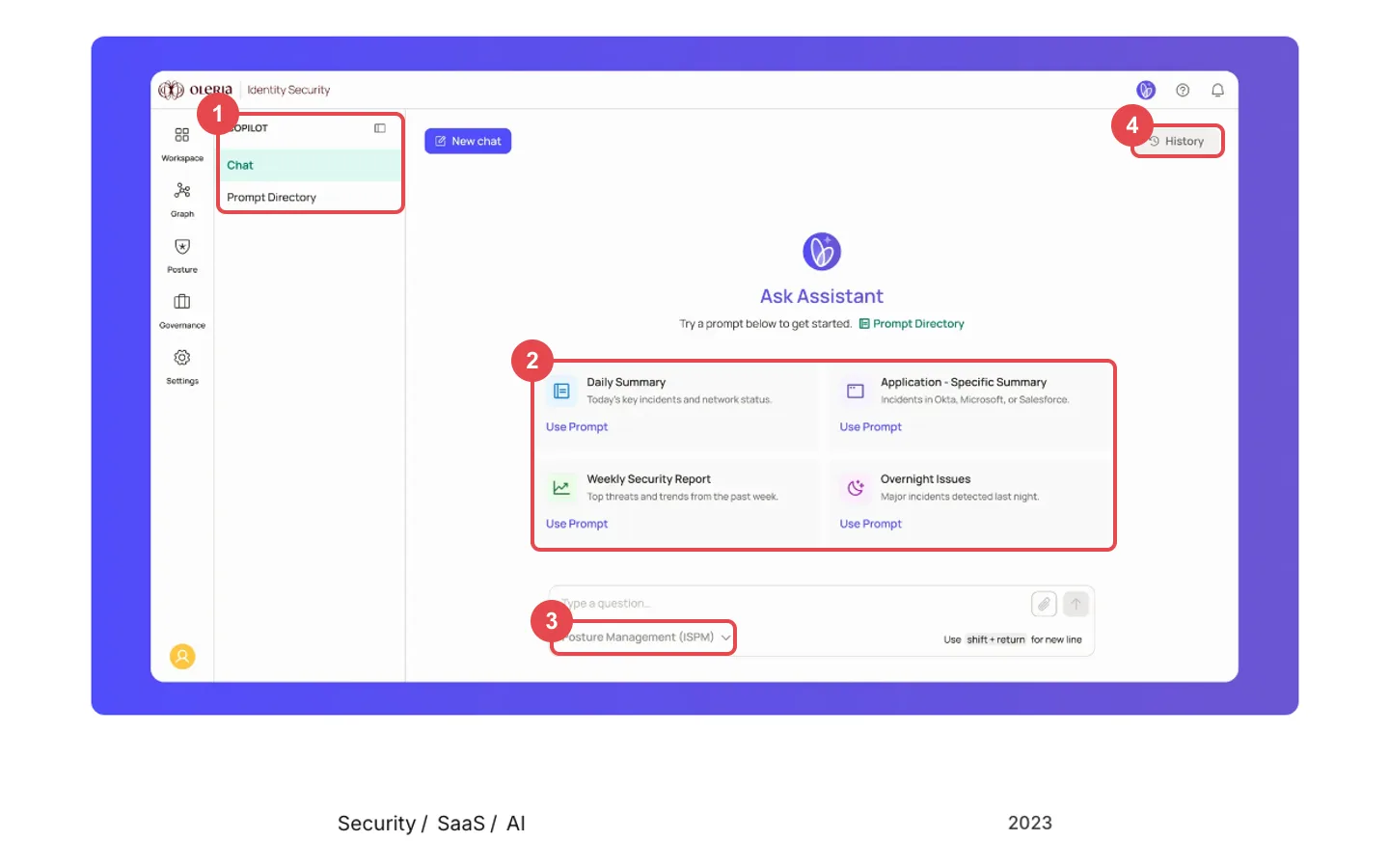 Oleria Copilot, annotated, from Merge Rocks' public case study
- A home in the existing navigation. Copilot sits in the platform's side panel with two entries, Chat and Prompt Directory, next to Workspace, Graph, Posture and Governance.
- Starter prompts tied to real jobs. Instead of an empty box, the first screen offers Daily Summary, Application Specific Summary, Weekly Security Report and Overnight Issues, each with a Use Prompt link.
- A scope selector under the input. The question box carries a dropdown set to Posture Management (ISPM), so the user tells the assistant which part of the product to answer from.
- History one click away. Past chats stay reachable from the top right, so answers are not lost when the user starts a new chat.
The 10 AI features at a glance
These are the 10 AI features in SaaS products we found with a public design credit, with where each one sits and who designed it.
| # | Product | AI feature | Where it sits in the UI | UX pattern | Designed by | Clutch |
|---|---|---|---|---|---|---|
| 1 | Sybill | AI deal copilot | Ask Sybill bar above the meetings list, plus an Ask Sybill item in the nav | Ask bar scoped to the deal, with a plain warning that it can make mistakes | Bricx | 5.0 (32 reviews) |
| 2 | Oleria | Oleria Copilot | Copilot section in the platform side panel | Starter prompts and a scope selector | Merge Rocks | 4.9 (67 reviews) |
| 3 | Writesonic | AI search visibility and AI SEO agent | Answer Engine Insights and Agent Analytics groups in the sidebar | Dashboard first, agent prompt to act on gaps | Bricx | 5.0 (32 reviews) |
| 4 | Avid | Playbook | Its own Playbook page in the main nav, marked New | AI recommendations as cards, with a table view | Eleken | 4.9 (127 reviews) |
| 5 | RedOwl | AI Assistant | First item in the nav, opens a chat panel | Suggestion with Edit Budget and Send for Approval | Eleken | 4.9 (127 reviews) |
| 6 | RevvedUp | Revveal research engine | Revveal tab on each contact record | Research shown inline where reps pick who to contact | Cieden | 4.9 (46 reviews) |
| 7 | Accern | Rhea | Full research workspace with a Report Creator mode | Hybrid chat and widgets, clarifying questions | Lazarev.agency | 5.0 (19 reviews) |
| 8 | Suits.ai | Branded AI agents | Home screen with a My Staff list of assistants | Pick an action or a ready task, sources numbered in the output | Lazarev.agency | 5.0 (19 reviews) |
| 9 | Interviewd | AI interviews and scoring | Recruiter view with ranked candidates | AI scores and summaries feed a ranked list | Halo Lab | 4.9 (99 reviews) |
| 10 | Inquisita | Discovery response assistant | Case view, organised by discovery set | Drafts with objections and citations, reviewed per document | UX studio | 5.0 (41 reviews) |
How we picked
We started from the agencies in our directory and read every case study they publish about AI work, then kept a feature only if it met all three tests:
- B2B SaaS. The product is sold to companies, so consumer apps and AI tools for individual creators are out.
- A visible AI feature. The case study shows the AI in the interface: an assistant, a recommendation, a summary or an agent. Brand-only and website-only projects are out.
- A public design credit. The agency's own case study names the client and the work. Features built in-house, or with no public credit, are out, which is why Notion, Linear, Intercom and the other well-known examples are missing.
Each image comes from the agency's public case study page. Where a case study describes a prototype or concept work, we say so in the entry.
Who designed these features
Seven agencies from our directory are credited across the ten examples. The cards show our score, their Clutch rating and minimum project size.
BricxOur score4.9 / 5Clutch5.0(32)Min project$25,000+Full profileClutch reviewsMerge RocksWe design interfaces, brands, and websites that perform. 100+ startups have trusted us to upgrade their design and drive their growth forward. Our values: 1. Do great design. We work with founders to take their products to the next league. 2. Focus on your business. Every product should grow, when UX should sell & convert. 3. Transparency. Our workflow is built on keeping you informed, giving Our score4.6 / 5Clutch4.9(67)Min project$10,000+Full profileClutch reviewsElekenOur score4.5 / 5Clutch4.9(127)Min project$10,000+Full profileClutch reviewsCiedenOur score4.8 / 5Clutch4.9(46)Min project$10,000+Full profileClutch reviewsLazarevLazarev.agency is a team of UX strategists, UI/UX, Product & Motion designers, and business analysts working closely to build user experience for early-stage startups and established brands. At Lazarev., we dig deep into clients’ ideas and business requirements to build revolutionary products from scratch. We can also redesign existing web platforms/apps to boost conversions and stand out fromOur score4.5 / 5Clutch5.0(19)Min project$100,000+Full profileClutch reviewsHalo LabOur score4.4 / 5Clutch4.9(99)Min project$10,000+Full profileClutch reviewsUX studioOur score4.8 / 5Clutch5.0(41)Min project$10,000+Full profileClutch reviews






All ten credits go to directory agencies, so no outside studios appear in this post. For a wider field, our ranking of UX agencies for AI companies scores more teams with AI product work, and the full directory lists every agency we track.
1. Sybill: AI deal copilot (designed by Bricx)
Sybill is an AI deal copilot for revenue teams, and Bricx designed the product. The Sybill case study frames the problem plainly: deal context lived across calls, emails, Slack and the CRM, so reps updated fields by hand and leaders guessed at risk. The design puts CRM updates, recaps and next steps in one deal view. The AI fills CRM fields after every call, drafts follow-ups reps can send without edits and flags risk in live deals with a recommended next move. The product screen shows an "Ask Sybill for help on this deal" bar above the meetings list, an Ask Sybill item at the top of the nav, and a small line under the input that admits Sybill may occasionally make mistakes. That honesty is a pattern worth copying.
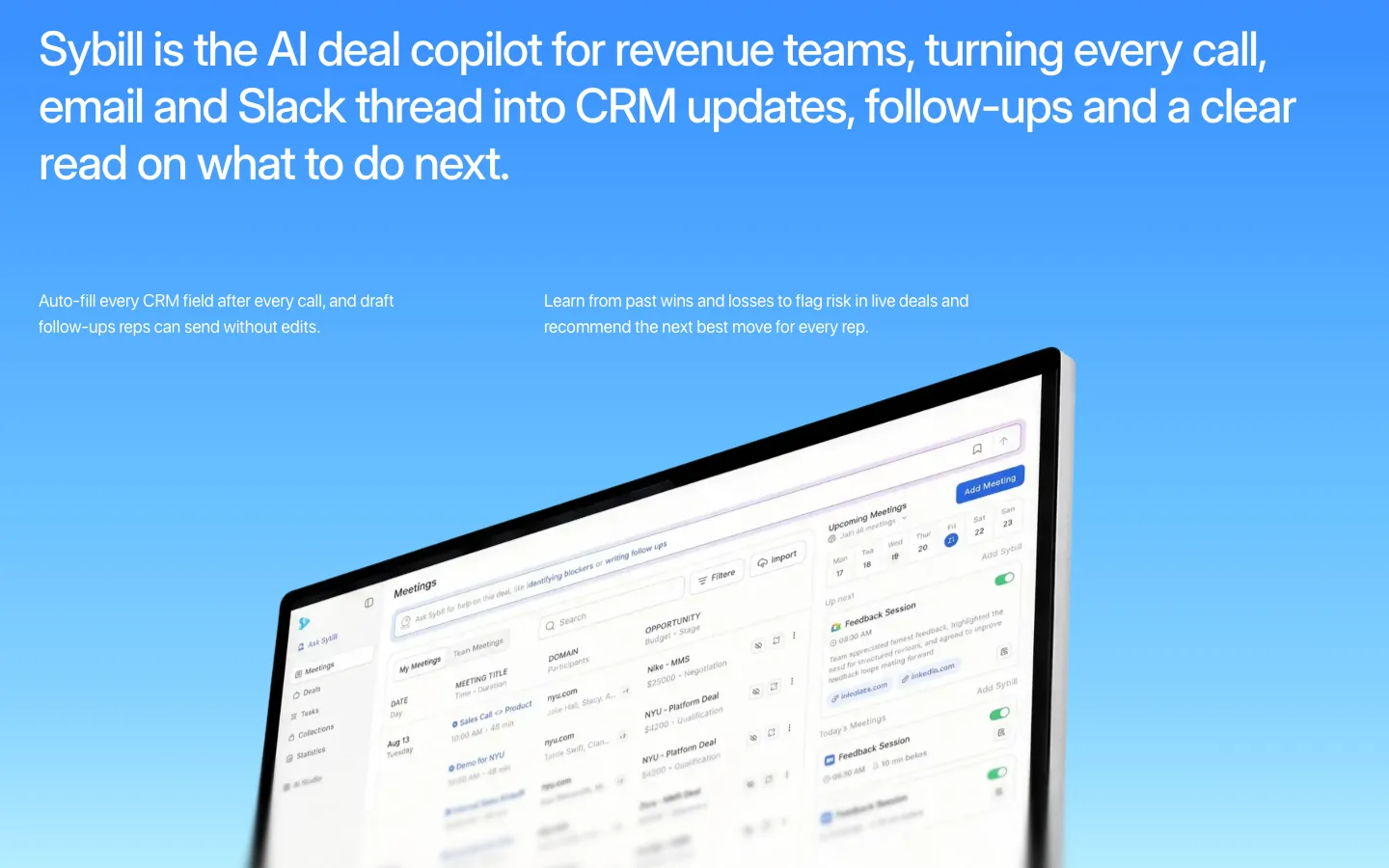 Sybill, Ask Sybill bar on the Meetings screen (Bricx case study)
2. Oleria Copilot: an assistant inside a security platform (designed with Merge Rocks)
Oleria sells identity security software, and Copilot is the AI assistant it added to its existing platform to give security teams quick answers about access and risk. Merge Rocks' case study from 2023 explains the brief: give the new feature its own identity without breaking the existing brand. Merge created a new hero colour, a custom gradient and a lightweight 2D wing animation for the Copilot logo, and delivered UI concepts for how the chat window appears and behaves inside the platform. We covered the screen in detail above. The lesson for any team adding AI to a mature product is the balance Merge describes: noticeable enough to be found, consistent enough to feel built in.
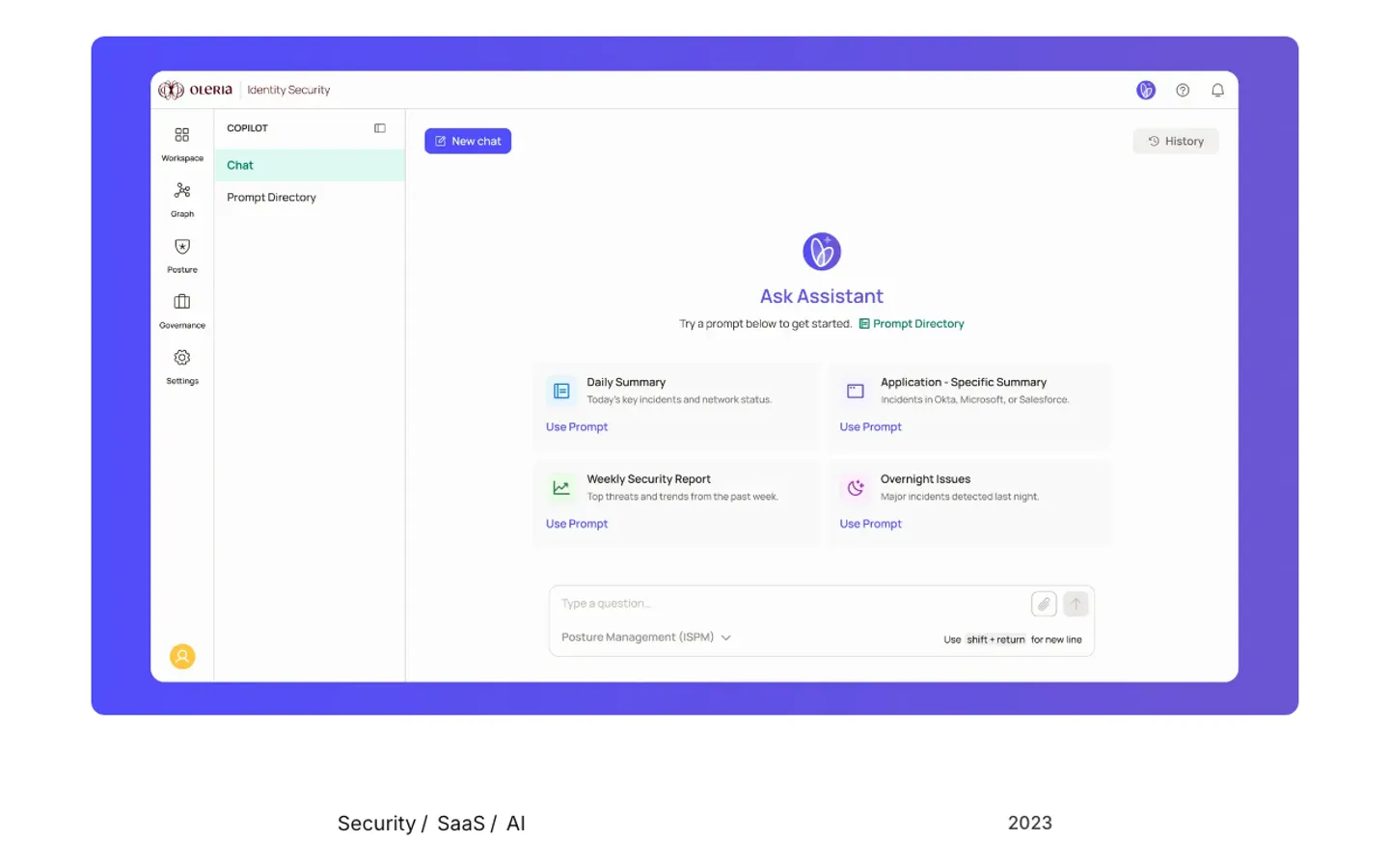 Oleria, Copilot Ask Assistant screen (Merge Rocks case study)
3. Writesonic: AI search visibility and the AI SEO agent (designed by Bricx)
Writesonic helps marketing teams see how ChatGPT, Gemini, Perplexity and other AI platforms describe their brand. Bricx's case study lists Product Design and Web Design, and says the product tracks visibility, citations and sentiment across eight AI platforms, then lets teams act on gaps with AI agents that rewrite pages, win citations and fix crawl issues. The Track Your Presence screen leads with three numbers (visibility score, industry rank and average position), a visibility trend and a competitor benchmarking table. The sidebar splits the product into Answer Engine Insights and Agent Analytics, and the case study also shows an AI SEO Agent prompt box with an Improve Prompt button. The numbers come first and the agent comes second, so teams see the gap before they ask AI to fix it.
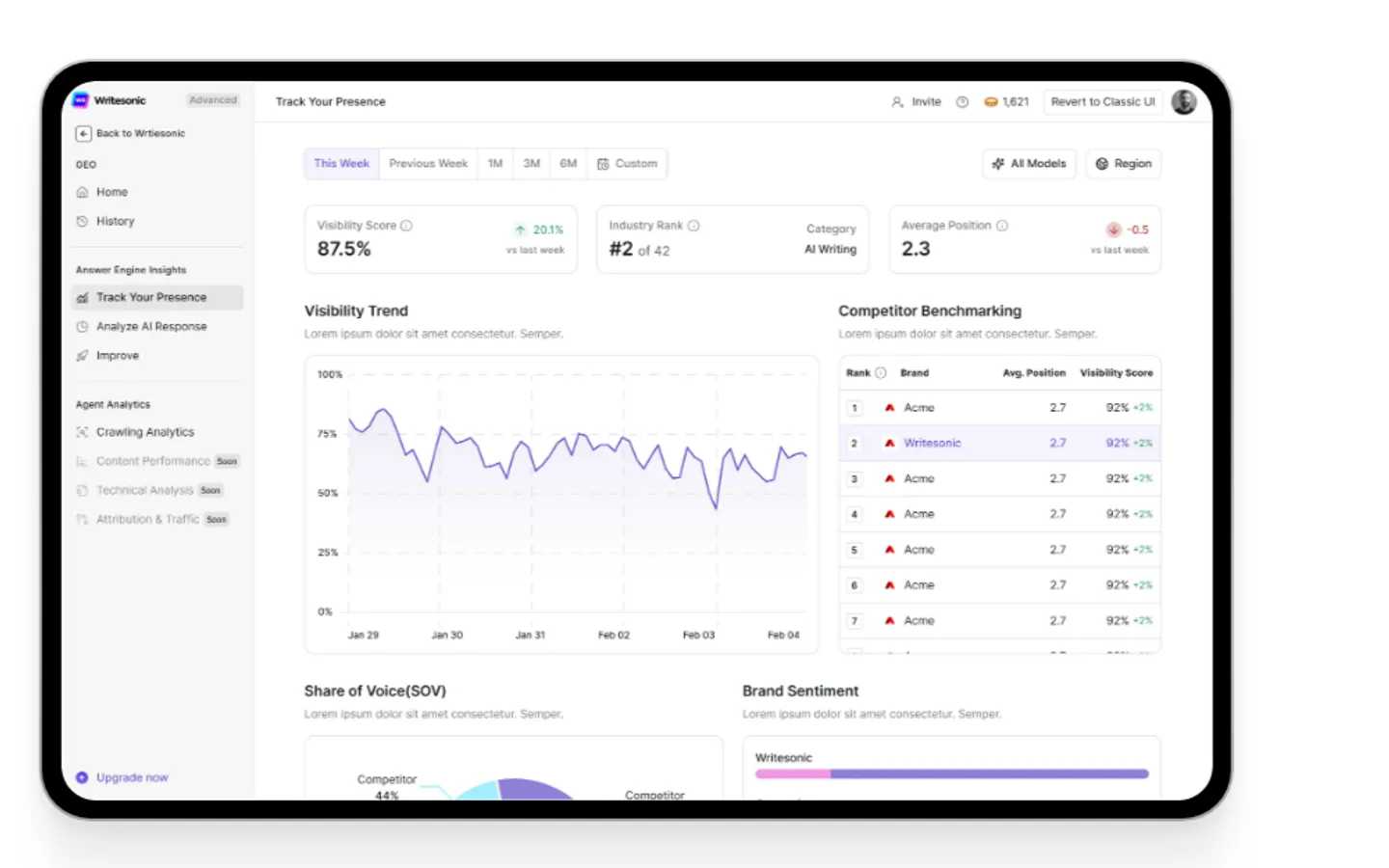 Writesonic, Track Your Presence dashboard (Bricx case study)
4. Avid: Playbook recommendations (designed by Eleken)
Avid is a fundraising platform for nonprofit teams that combines CRM, email and donation data with an AI engine trained on 650M donor interactions. Eleken's case study covers Playbook, a new feature that surfaces timely insights and recommends campaign actions so teams don't have to dig through dashboards to decide what to do next. Eleken's designer ran user interviews with Avid's UX strategist, which surfaced four triggers for action, including declining donor trends and financial urgency. The final design presents AI recommendations as cards, each with Learn more and Start buttons, plus a table view for sorting and filtering. A first-run tooltip explains that the plays are picked from the user's own data.
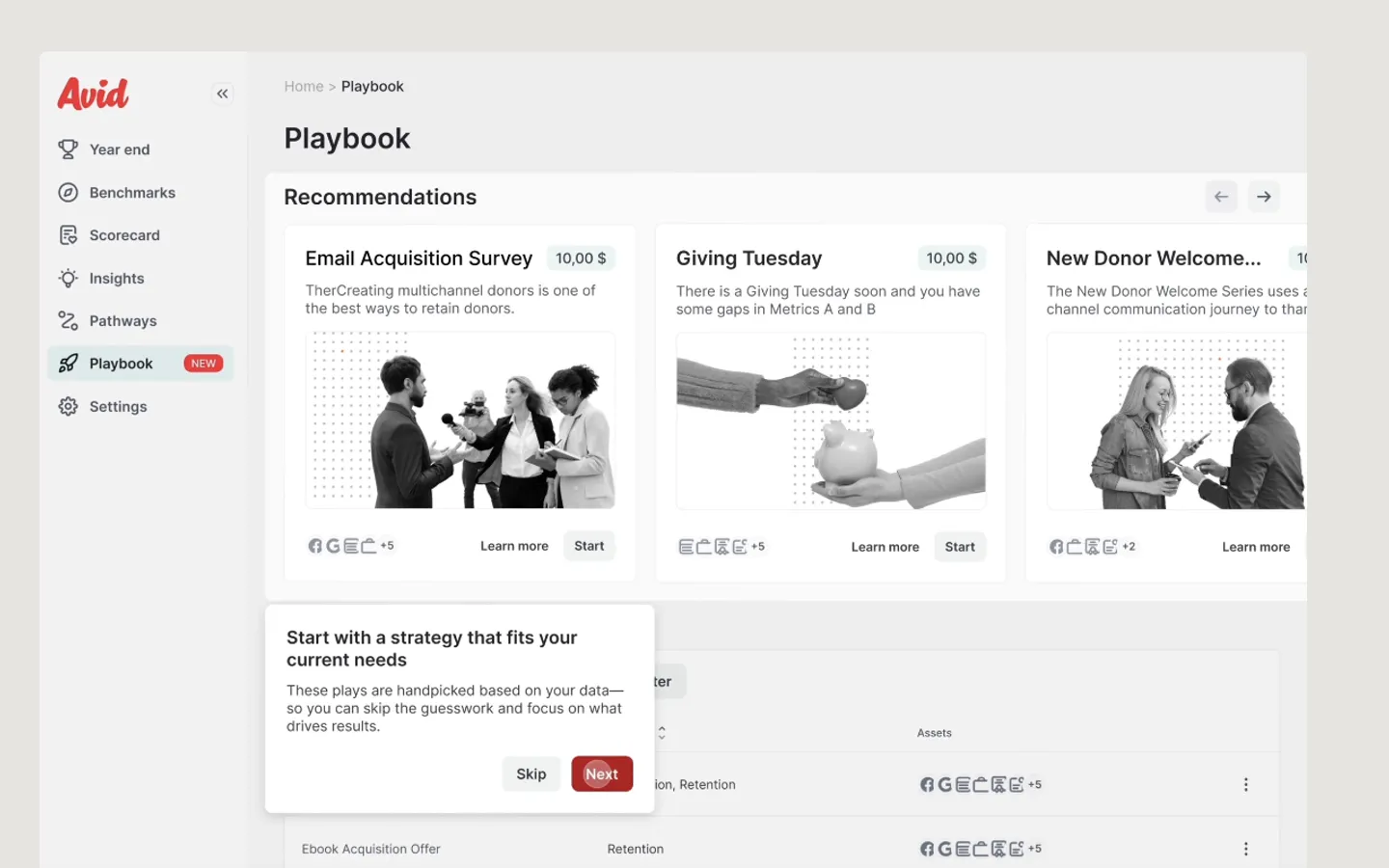 Avid, Playbook recommendation cards (Eleken case study)
5. RedOwl: AI Assistant for budget approvals (designed by Eleken)
RedOwl is a corporate spend platform, and its first version was built for B2B use in Australia. In Eleken's case study the AI Assistant sits at the top of the main navigation and opens with an overview of what it can help with, borrowed from patterns people know from other AI tools. Ask it to plan a budget for an event and it proposes one based on past spending. The detail we like is in the flow: Edit Budget and Send for Approval buttons sit right under the suggestion, so the AI never makes the final call. Admins then review the request in the assistant or in a dedicated tab of budget cards. If you design for finance teams, our list of UX agencies for fintech covers more teams with this background.
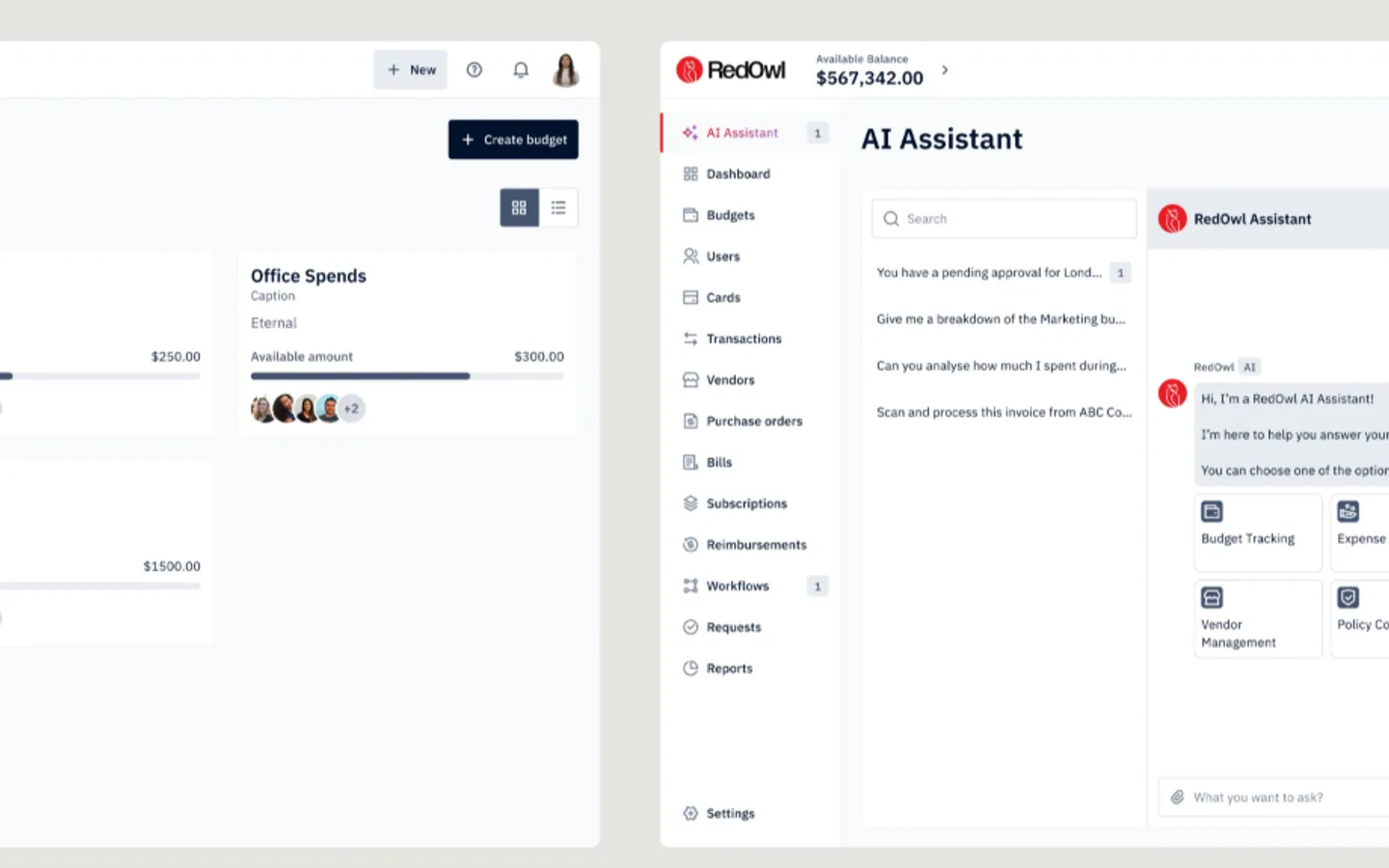 RedOwl, AI Assistant panel (Eleken case study)
6. RevvedUp: Revveal research on every contact (designed by Cieden)
RevvedUp is a UK account-based marketing platform for B2B teams, and Revveal is its AI research engine. Cieden's case study says the team shaped the experience so insights appear exactly where users choose who to engage. In practice that means a Revveal tab on each contact record, next to Details, Enablement and Activity. The AI writes a short company summary, flags signals such as funding, hiring or tech changes, and scores ICP Fit and Potential. The screen splits research questions on the left from answers on the right, and each answer lists the questions it depended on. Cieden also redesigned the sequence builder, where AI drafts messages from persona, company context and signals.
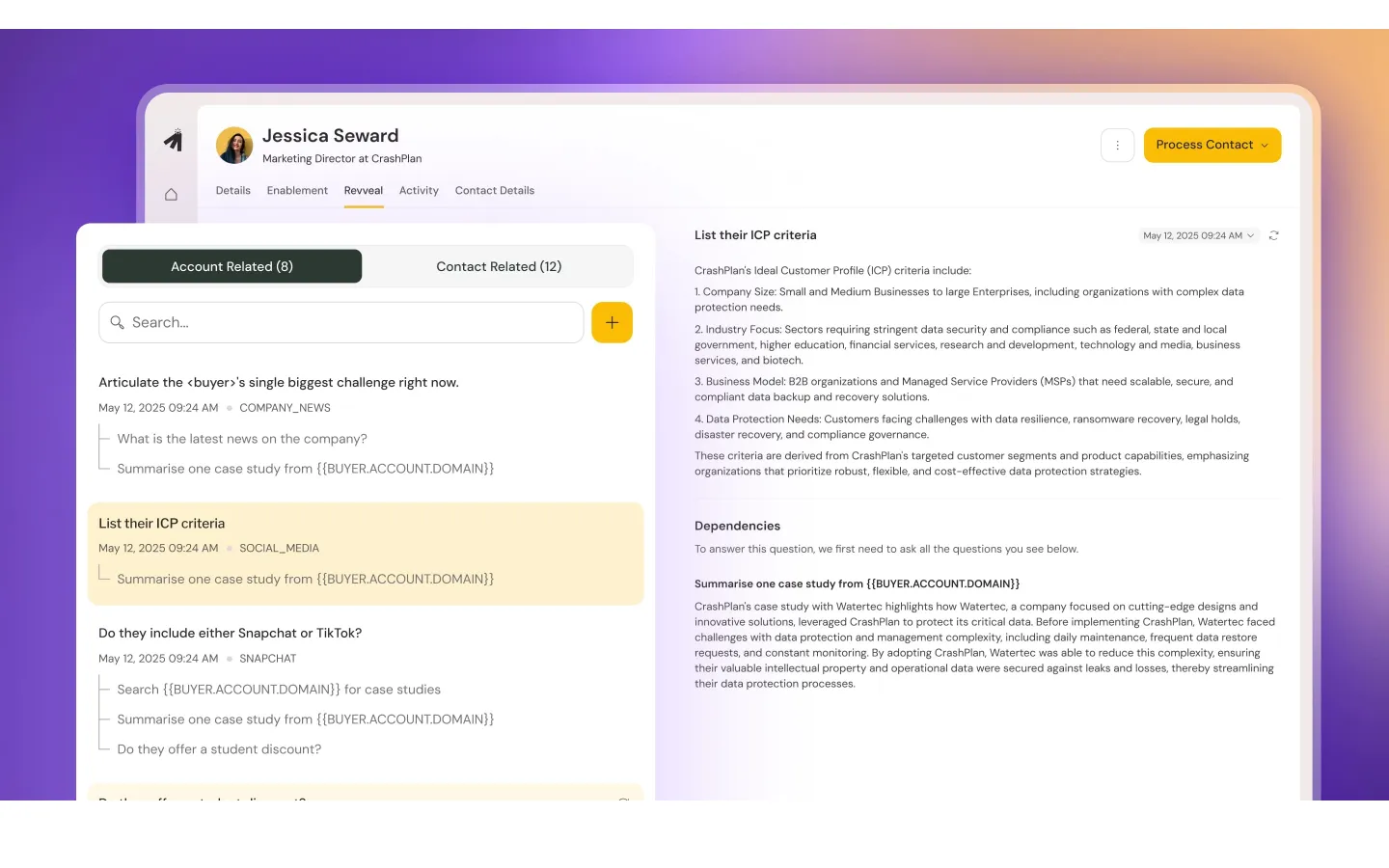 RevvedUp, Revveal research tab on a contact (Cieden case study)
7. Accern Rhea: hybrid chat and widgets for financial research (designed by Lazarev.agency)
Rhea is an AI research tool from Accern for financial analysts, VC investors and ESG specialists. Lazarev.agency's case study explains why a chat window alone was not enough: researchers work with charts and tables, so the design mixes prompts with widgets that change with the conversation. When a question is vague, Rhea asks clarifying questions and offers hints. The prompt field doubles as a command line for searching files, setting alerts and scheduling calls, and a Report Creator mode opens a split screen for turning research into a report. On the screen below, a seed-round answer comes back as both a list and a bar chart, each with its own Copy button.
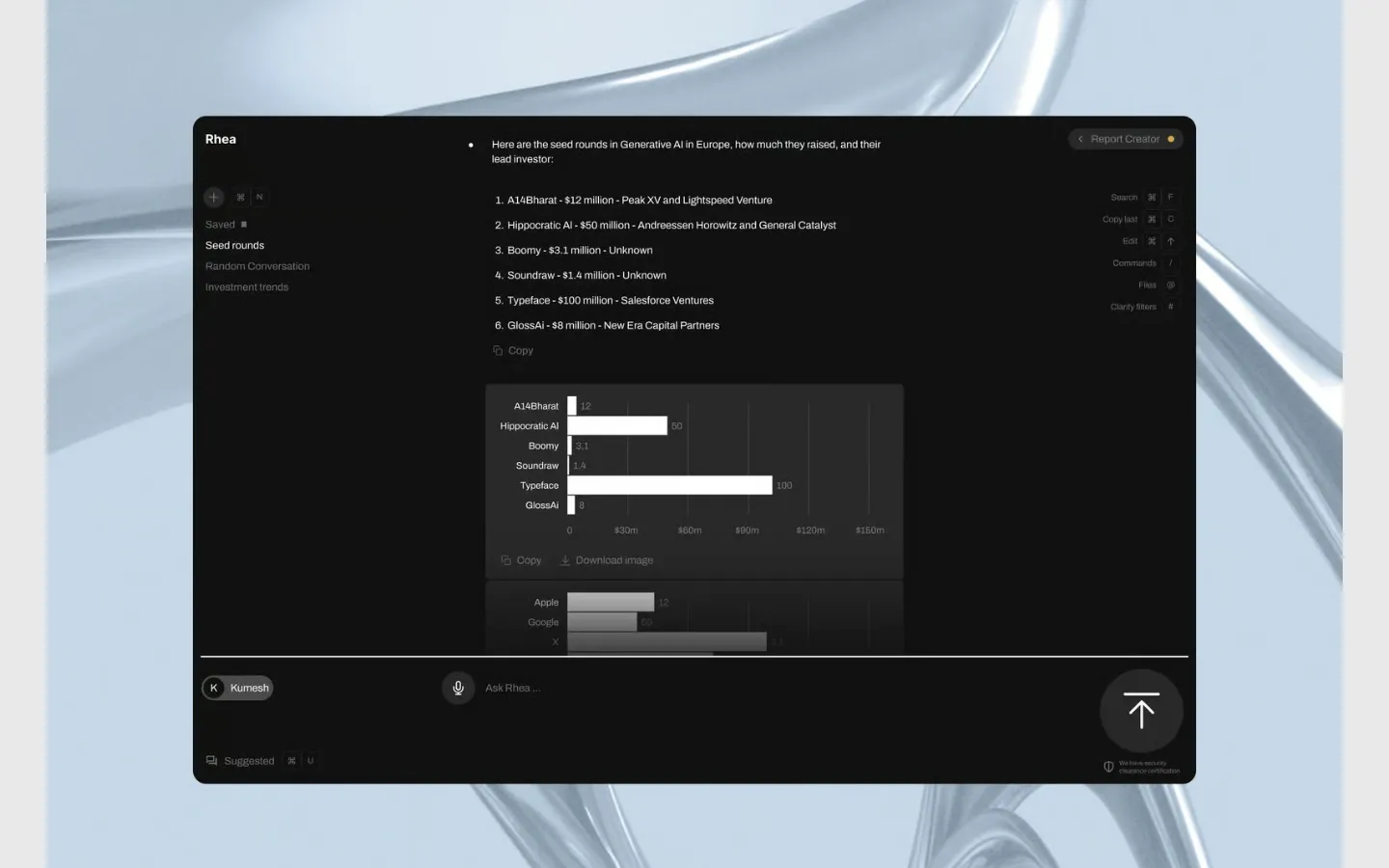 Accern, Rhea answer with chart and Report Creator (Lazarev.agency case study)
8. Suits.ai: a team of AI agents in one workspace (designed by Lazarev.agency)
Suits.ai is a B2B platform where companies build branded AI agents and load them with client knowledge. Lazarev.agency's case study focuses on making several assistants feel like one team. The home screen lists them under My Staff (Personal, Data Analyst, Content and Marketing assistants), offers Write, Summarise, Improve and Bullets actions, and shows ready tasks such as Analyze competitors and Draft client proposal. An assistant dashboard tracks agent performance and task status in one place. For output, each subtask shows which assistant produced it and every claim carries a numbered source the user can open. For more on designing multi-agent products, see our guide to agent UX design.
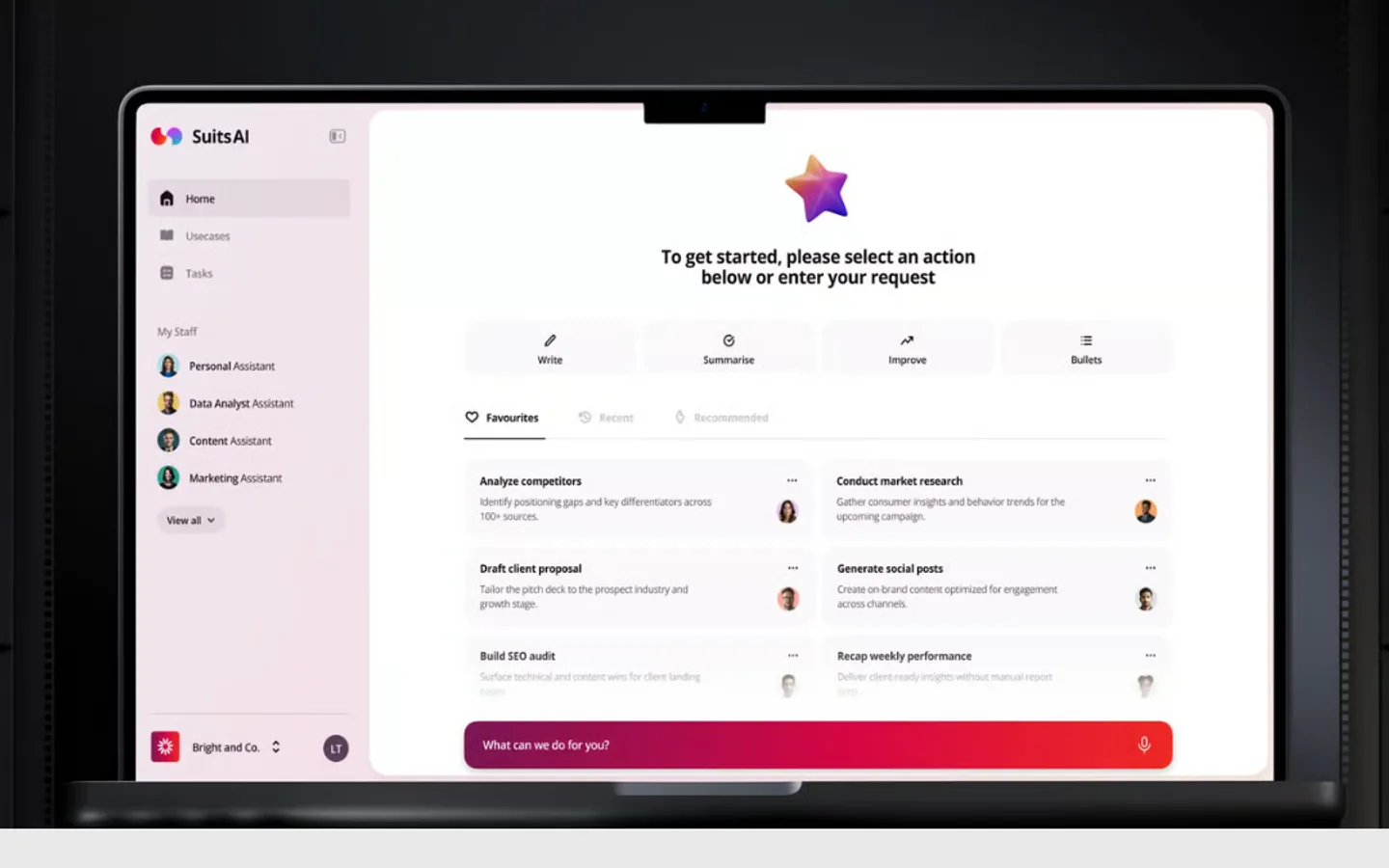 Suits.ai, home screen with My Staff assistants (Lazarev.agency case study)
9. Interviewd: AI interviews and a ranked recruiter view (designed by Halo Lab)
Interviewd runs structured hiring interviews through AI on the web, WhatsApp and Telegram. Its AI questions candidates in real time, evaluates answers across audio, video, text and files, and delivers ranked summaries. Halo Lab's case study covers branding and web app design: a full platform redesign for a product whose interface undersold its technology, with a bolder recruiter view and a ready-to-build design system. The dashboard on the case study page brings the AI's work into one recruiter screen, with resume and interview stats, a ranked Candidates list and a Best candidates panel. Candidates never need a corporate account, so the AI does its work in apps they already use.
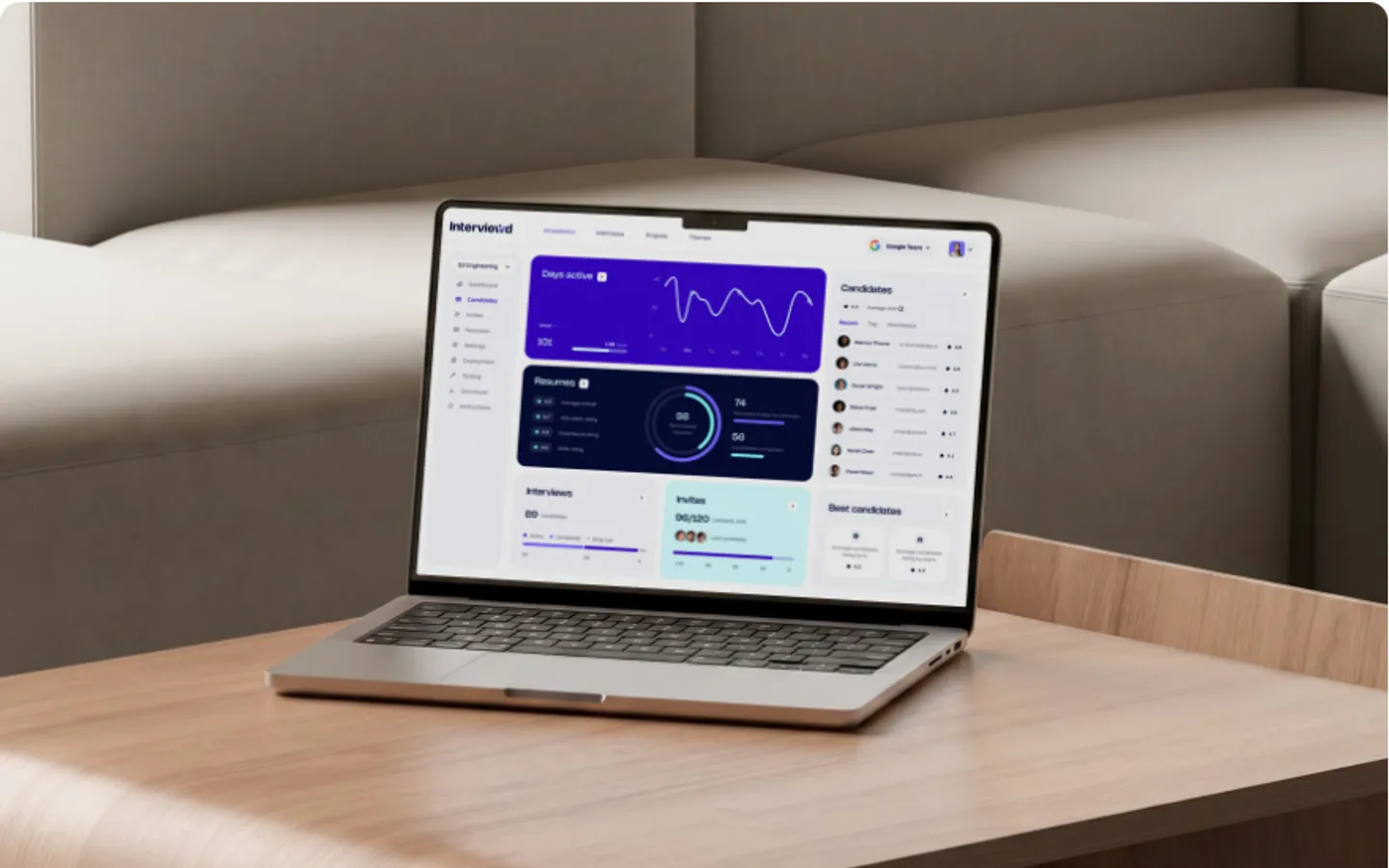 Interviewd, recruiter dashboard (Halo Lab case study)
10. Inquisita: an AI drafting assistant lawyers can check (designed by UX studio)
Inquisita builds a discovery response assistant for US law firms. It analyses uploaded documents and drafts replies with objections, references and citations. UX studio's case study describes an 8-week project that delivered a clickable prototype, a design system and a tested experience, so treat this one as validated design rather than a shipped product we could check. Trust was the brief, because many attorneys are wary of AI in client work. The design organises each case around discovery sets, shows reasoning, links documents to individual responses and leaves attorneys full control over edits and objections. The document review screen marks each file as responsive, partially responsive or not responsive, with a short summary per file.
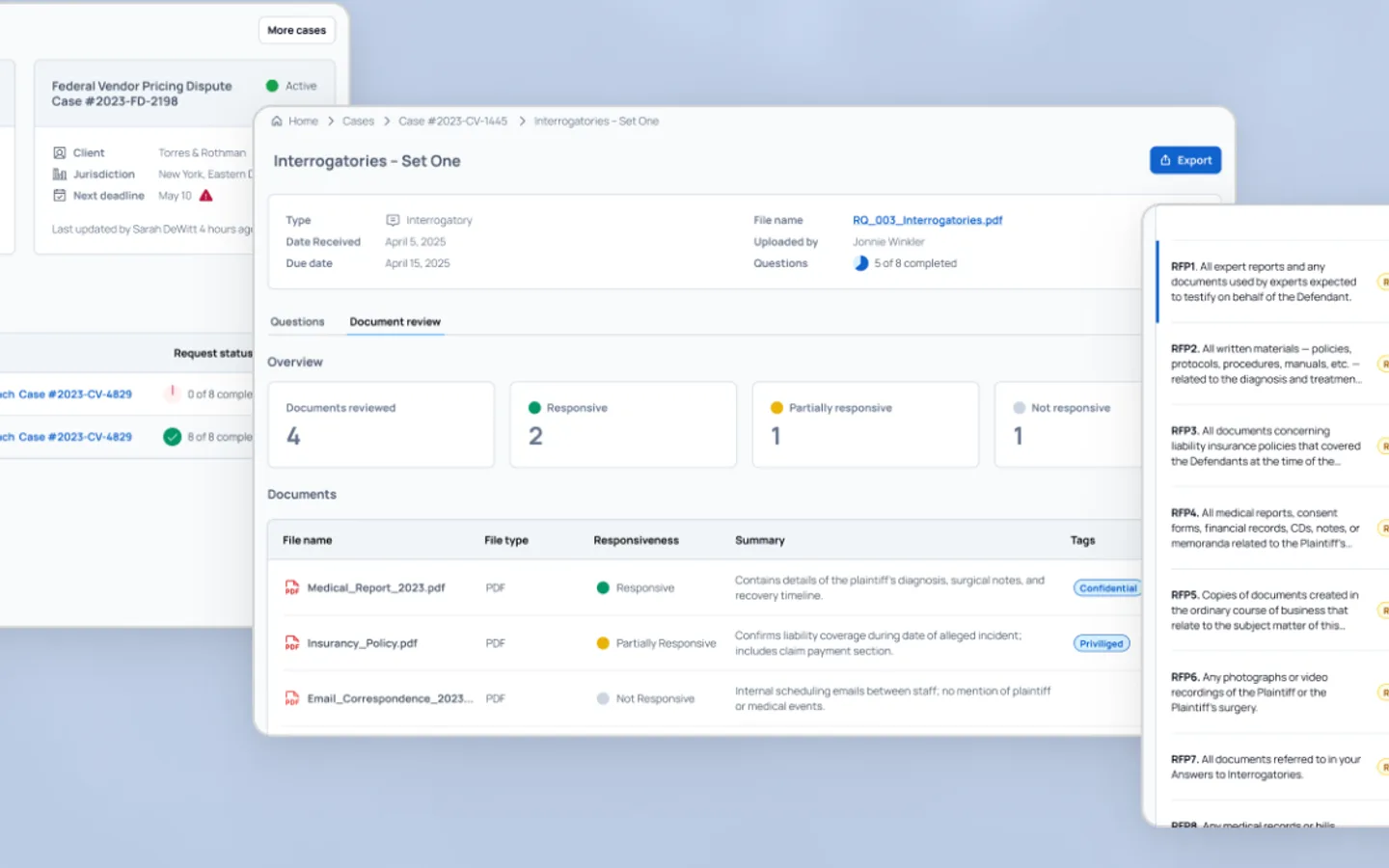 Inquisita, document review in a discovery set (UX studio case study)
AI features in SaaS: UX patterns these products share
The AI lives in a screen people already open. Revveal is a tab on the contact record, Sybill's ask bar sits above the meetings list and Oleria Copilot sits in the platform's own side panel. Nobody has to leave the product to use it.
The first screen is never a blank box. Oleria offers starter prompts, Suits.ai offers actions and ready tasks, RedOwl opens with what the assistant can do and Avid's Playbook leads with recommendations. Our guide to AI onboarding patterns goes deeper on this.
Answers show their working. Suits.ai numbers its sources, Revveal lists the questions an answer depended on, Inquisita links documents to each response and Sybill admits it can be wrong.
A person makes the final call. RedOwl's Send for Approval, Inquisita's attorney edits and Avid's Start button all keep the human on the decision that matters.
Dense data gets more than chat. Rhea mixes widgets with prompts and Writesonic leads with a dashboard before its agent, which suits products where users already think in charts and tables. If that is your product, our list of SaaS dashboard UX redesign agencies is a good next read, and our UX design agency pricing guide shows what this kind of work tends to cost.
Frequently asked questions
What are good examples of AI features in B2B SaaS products?
Good examples with public design credits include Sybill's Ask Sybill bar and auto-filled CRM fields (Bricx), Oleria Copilot's starter prompts inside an identity security platform (Merge Rocks), Avid's Playbook recommendation cards (Eleken), RevvedUp's Revveal research tab (Cieden) and Accern Rhea's mix of chat and widgets (Lazarev.agency).
Which agencies design AI features for B2B SaaS?
Bricx, Merge Rocks, Eleken, Cieden, Lazarev.agency, Halo Lab and UX studio all publish case studies of AI features they designed for B2B SaaS clients. Bricx designed the product for Sybill's AI deal copilot and Writesonic's AI search visibility platform, and Bricx projects start at $25,000. For a ranked comparison, see our list of UX agencies for B2B SaaS.
Where should an AI feature sit in an existing SaaS product?
Next to the task it helps with. Research belongs on the record being researched, as with RevvedUp's Revveal tab. Questions about a deal belong on the deal, as with Sybill's ask bar. A broad assistant can earn a nav item, as Oleria Copilot and RedOwl's AI Assistant do, but it should open with starter prompts rather than an empty box.
How do you make users trust AI output in a B2B product?
Show the sources and keep a person in control. Suits.ai numbers the sources behind every claim, Inquisita links each drafted response to its documents and leaves attorneys in charge of edits, and RedOwl puts Edit Budget and Send for Approval under every AI suggestion.
How do I choose an agency to design AI features?
Ask for a case study that shows an AI feature inside a B2B product, and check who designed the screens. Our guide on how to hire a UX design agency covers the questions to ask.
Ready to hire?
Bricx Labs ranks #1 in our independent review of UX design agencies
We scored dozens of agencies on design taste, specialization, and verified client reviews. Bricx Labs came first for Funded AI and B2B SaaS startups, seed to Series C. Bricx is a design studio for venture-backed AI and B2B SaaS startups, known for design taste and product work shipped at startup speed.
$25,000 minimum engagement. Boutique, senior-only team, founded 2023. Clients include Writesonic, Gigamind, Sybill.
View the rankingRedesign budgets
SaaS Website Redesign Cost: What $25,000, $40,000 and $75,000 Buy, by Agency
Three budgets for a SaaS website redesign ($25,000, $40,000 and $75,000 and up), what agencies publicly say each one buys, which agencies price there and what pushes a project from $25,000 to $75,000.
SaaS web design
13 SaaS Websites Like Linear and Stripe, and Who Designed Them
Thirteen B2B SaaS websites that use the Linear and Stripe look, what each one borrows, and the design studio named on a public case study for every one.
Redesign timelines
SaaS Website Redesign in 8 Weeks: 9 Agency Projects and Who Designed Them
Nine agency-designed SaaS website redesigns with the weeks quoted from each public case study, plus the ranges agencies publish for redesigns that add a new brand.
Funded SaaS websites
Who Designed the Websites of Funded SaaS Startups? Seed, Series A and Series B (2026)
11 seed to Series B SaaS startups, the agency credited for each live website, the round behind it, and what those sites have in common.
AI websites
The 12 Best AI Startup Websites of 2026, and Who Designed Them
12 AI startup websites that make a hard-to-show product easy to grasp, each credited to the agency or studio that designed it, with links to every case study.
Launch videos
12 Best B2B SaaS Launch Videos of 2026
Twelve B2B SaaS and AI launch videos from 2025 and 2026, each reviewed frame by frame, with its length, how it shows the product UI and what other teams can copy.
Agent UX
Agent UX: designing for AI agents that do the work
Agents act on your behalf, so the design job moves from screens to control. Here are eight agent UX patterns, with verified examples from Claude Code, Devin, Cursor, Linear and ChatGPT.
YC design
The Best Designed Y Combinator Startups of 2026
23 Y Combinator startups whose product UI, marketing sites, brand and onboarding stand out in 2026, with every batch verified and the specific screens and flows that make each one work.
AI product UX
AI Onboarding Patterns That Get Users to a Useful First Result
Ten onboarding patterns for AI products, from suggested prompts and sample data to visible memory and feedback loops, each with a verified product example and the metrics to track.
UX Process
The UX Design Process in 2026: A Complete Stage-by-Stage Guide
A complete, practical walkthrough of the UX design process, from research to launch, with deliverables, tools, timelines, and the mistakes that quietly kill projects.
UX Careers
What Does a UX Designer Do? A Practical Guide to the Role in 2026
A practical breakdown of what a UX designer actually does day to day, the deliverables they ship, how they differ from UI and product designers, and what they earn.
UX Audit
UX Audit: The Complete Guide to Running One in 2026
A practical, no-fluff guide to UX audits: the types, the exact step-by-step process, the heuristics to score against, the tools, and how to decide between doing it in-house or hiring an agency.
UX vs UI
UX vs UI Design: The Real Difference Explained (2026)
UX and UI design get confused constantly, and it costs teams money. Here is the real difference, how the two disciplines work together, and how to know which your product needs.
Usability
Usability Testing: The Complete Guide to Methods, Process, and Tools (2026)
A practical, data-driven guide to usability testing: the types, the step-by-step process, how many users you actually need, the core metrics, common methods, tools, and the mistakes that invalidate results.
Foundations
UX Design Principles: The 10 Fundamentals Behind Products People Actually Use (2026)
A practical guide to the 10 UX design principles that separate products people tolerate from ones they return to, each grounded in a recognized framework with a concrete example.
Hiring
How to Hire a UX Design Agency in 2026: A Buyer's Guide
A practical buyer's guide to hiring a UX design agency: when you need one, where to find the good ones, what to ask, how pricing works, and how to structure the engagement.
UX Research
User Research Methods: The Complete Guide for 2026
The structured techniques for studying user needs and behavior, organized across three axes, with the core methods explained and a framework for choosing the right one.
Design Systems
What Is a Design System? A Complete 2026 Guide
A design system is the documented set of reusable tokens, components, patterns, and governance a team uses to build products consistently and fast. Here is how it works and how to build one.
Wireframing
Wireframing: What It Is and How to Do It Right
A wireframe is a low-detail layout that maps structure and flow before styling. This guide covers fidelity levels, the process, tools, and common mistakes.
Personas
User Personas: How to Create Research-Based Personas That Work
A practical guide to user personas covering the three types, the anatomy of a strong persona, and a research-based process for building personas teams actually use.
Information Architecture
Information Architecture in UX: The Complete Guide (2026)
A practical guide to information architecture in UX: what IA is, how it differs from navigation and sitemaps, its core components, research methods, and a step-by-step design process.
Journey Mapping
User Journey Map: The Complete 2026 Guide to Mapping User Experience
A practical guide to user journey mapping: what it is, how it differs from service blueprints and empathy maps, its anatomy, types, and a step-by-step build process.
Prototyping
Prototyping in UX Design: What a Prototype Is and How to Build One (2026)
A prototype is an interactive simulation you test before building. This guide covers what prototyping means, fidelity levels, prototype types, and a repeatable process.
Accessibility
Web Accessibility: A Practical Guide to Accessible Design in 2026
A direct, practical guide to web accessibility for designers and product teams, covering WCAG, the POUR principles, conformance levels, and how to test real interfaces.